
Storage
Your Mac says the startup disk is full. Here is where the space actually went.
Emptying the Trash barely moves the number, because the space is rarely where you are looking. What System Data really contains, and how to find the real answer before deleting anything.
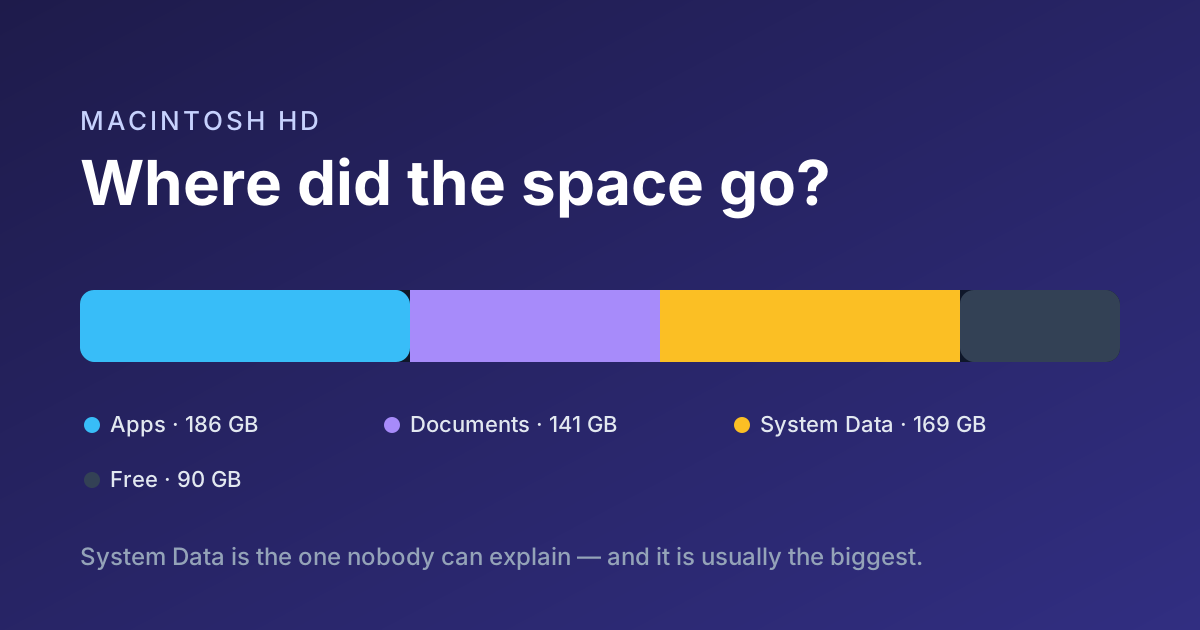
You clear the Downloads folder, empty the Trash, and macOS still says the startup disk is full. The number barely moves. This is the most common storage complaint on a Mac, and the reason is almost always the same: the space is not where you are looking.
System Data is not one thing
About This Mac shows a category called System Data, and it can run to tens or even hundreds of gigabytes. It is not a folder you can open. It is what macOS calls everything it could not file elsewhere, and on a working machine that usually means four things.
- Local snapshots. Time Machine keeps hourly copies on your internal disk, even when the backup drive is unplugged. They can hold tens of gigabytes and they pin deleted files, which is why deleting things sometimes frees nothing at all.
- Application caches. Browsers, design tools, package managers and AI tooling all keep large local caches. They are regenerable, but nothing clears them on your behalf.
- Cloud placeholders that are not placeholders. A file marked online-only still occupies space until it is actually evicted.
- Old versions and derived data. Xcode simulators, container images, and backup engine caches are the usual heavyweights.
Find the real answer before deleting anything
The instinct is to start deleting. The better move is to measure first, because the biggest item is rarely the one you suspect. Storage Studio's Storage Inspector walks your disk and shows what is actually there, largest first, with the caches and snapshots named rather than hidden inside a mystery category.
The largest thing on a full Mac is usually something the owner did not know existed.
What we see in nearly every support ticket
Then move, rather than delete
Most of what fills a Mac is not junk — it is work you still want. Deleting it is a loss; moving it to a fast external drive is not. Storage Studio relocates folders and apps to an external SSD and leaves a shortcut at the original path, so everything still opens exactly where it always did.
See what is using your spaceFree for 15 days. No card required.